
6. Network Configuration Overview
This chapter describes network requirements for the VDURA V5000 system, as well as the VDURA networking architecture’s logical networks and networking modes.
This chapter contains the following sections:
6.1 V5000 Network Requirements
6.1.1 Introduction
The V5000 Data Platform has specific requirements for the high-speed data network to achieve full functionality and best performance. Note that the requirements change depending on the network type.
6.1.2 V5000 High-Speed Data Network Connection
Customers must define and provide the network environment (switches, cables, and configuration) and VDURA works within that environment. In the following diagrams the customer provides the elements shaded with gray.
The high-speed data network (referred to as the primary network in VDURA documentation) can be either Ethernet or InfiniBand, but not both concurrently.
The realm requires a range of static IP addresses in a single subnet to be assigned to the nodes on the high-speed data network. The subnet may be non-exclusive, meaning it may be shared with clients and other devices. The IP range assigned to the nodes may be non-contiguous, but grouping the IPs as much as possible is recommended for ease of management. The realm is responsible for IP address assignment to its nodes from the supplied range using a proprietary discovery mechanism.
You will need to accommodate the following requirements when determining the range size:
- 1 IP address per Director Node
- 13 or 17 IP addresses per Storage Node depending on the number of NVMe SSDs
- Optionally, 20 extra IP addresses to cover delays in releasing formerly used addresses and for future expansion.
The initial configuration will assign a fixed IP address to the first Director Node. The remaining addresses from the assigned range will be dynamically assigned by this Director to the other nodes.
The realm’s dynamic IP address assignment will not conflict with any DHCP services on the high-speed data network. The V5000 realm will ignore DHCP on the high-speed data network. However, it is expected that the static IP address range assigned to the realm has been removed from the address pool of any DHCP servers occupying the realm subnet.
The realm nodes use the default route to contact devices external to the subnet. Static routes may be configured on the data-path network to reach clients and services on other subnets if using the default gateway is not desired.
A V5000 realm does not have a private or back-end network. The realm connects directly to the high-speed data network used by the clients. Director Nodes also have 25 GbE network connections for additional services.
Keep the following points in mind regarding node port bandwidth:
- Director Nodes focus on IOPS instead of bandwidth and require two 200 Gb or 400 Gb ports per node.
- Storage Nodes focus on IOPS and bandwidth and require four 200 Gb ports or two 400 Gb ports per node for a total of 800 Gb available bandwidth.
- All node types configure the physical network ports for failover.
6.1.3 Other V5000 Network Connections
25 GbE ports
Director Nodes have dual 25 GbE ports, known as secondary interfaces, for the following purposes:
- Realm management using PanCLI and PanActive Manager
- NFS/SMB/S3 gateway services
- Accessing NTP, DNS, and authentication services not available on the high-speed data network
- Connecting to the corporate network
There are several configuration rules regarding the 25 GbE ports:
- The subnet for the 25 GbE links should be separate from the data-path subnet.
- A pool of IP addresses is statically assigned to the secondary network interfaces. One IP address per Director Node should be provided; the addresses do not need to be contiguous.
- Static routes cannot currently be configured for the secondary 25 GbE network.
- It is optional but recommended that the interfaces operate as a failover bond.
1 GbE ports
All node types have 1 GbE ports for out-of-band management using the on-board Baseboard Management Controller (BMC). Addresses may be assigned statically or dynamically (using standard DHCP) as desired.
In the following diagrams, the Storage blocks show two connections representing failover capability but may have up to four physical connections.
6.1.4 NTP Server
The V5000 realm and the clients must synchronize time with the same NTP server, preferably a local NTP server, to maintain coherency between client transactions with shared files.
- DirectFlow running on a client server will not mount the filesystem if the client server time differs from the realm time by more than eight seconds.
- Variance between client server time and realm time of more than one second will have a negative performance impact.
Director Nodes in the V5000 realm must be able to reach the NTP server through either the high-speed data network or the optional 25 GbE corporate network ports. Storage Nodes synchronize with the Director Nodes and do not need to reach the NTP server directly.
6.1.5 InfiniBand Data Network
For an InfiniBand high-speed data network, the realm must connect to the same high-speed data network as the clients.
- Ports can be split evenly across two InfiniBand switches for redundancy.
- Supported MTU sizes are 1500, 2044, and 4092.
- The clients and realm nodes should communicate through IPoIB.
Director Nodes have dual 25 GbE ports for connections to the corporate network fabric for additional services.
All nodes in the realm have 1 GbE network ports for out-of-band management using a BMC.
Example InfiniBand Data Network
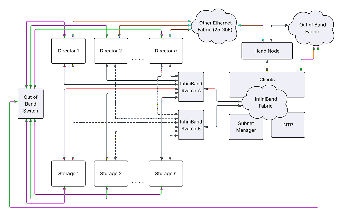
The Head Node in the diagram below is a server that manages the clients and usually has access to all three networks: the high-speed data fabric, the Other Ethernet or management fabric, and the Out of Band or IPMI fabric. The Head Node may also replicate services such as NTP and DNS for the high-speed data fabric.
The diagram below shows the NTP server connected to the InfiniBand fabric, but it could be on a different network available to the Director Nodes, accessed through their 25 GbE ports.
InfiniBand Subnet Manager Requirements
The InfiniBand Subnet Manager configuration must meet the following requirements:
- Virtualization must be enabled, as Storage Nodes have multiple virtual services sharing the InfiniBand ports using SR-IOV. For OpenSM, this setting is virt_enabled 2.
- All V5000 realm nodes must be in the same partition. The partition must enable support for IPoIB along with the corresponding IPoIB broadcast group.
6.1.6 Ethernet Data Network
For an Ethernet high-speed data network, the realm must connect to the same high-speed data network as the clients.
- The ports can be split evenly across two Ethernet switches for redundancy.
- Supported MTU sizes are 1500 and 9000.
Director Nodes have dual 25 GbE ports for connections to a general network fabric for additional services.
All nodes in the realm have 1 GbE network ports for out-of-band management using a BMC.
Example Ethernet Data Network
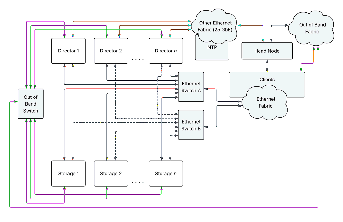
The Head Node in the diagram below is a server that manages the clients and usually has access to all three networks: the high-speed data fabric, the Other Ethernet or management fabric, and the Out of Band or IPMI fabric. The Head Node may also replicate services such as NTP and DNS for the high-speed data fabric.
The diagram below shows the NTP server connected to a separate Ethernet fabric available to the Director Nodes accessed through the 25 GbE ports, but it could also be on the high-speed data network available to the Director Nodes accessed through the 25 GbE ports.
6.1.7 Data Network Port Connections
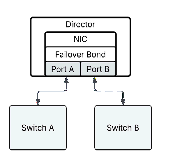
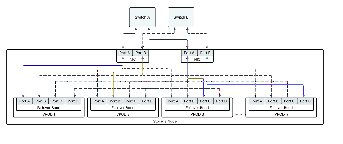
Director Nodes have two 200 Gb or 400 Gb ports for the data network. These ports are bonded together for active-passive failover. The failover configuration does not require LACP or MLAG; the ports operate as standard connections. The ports can connect to different switches for the best availability.
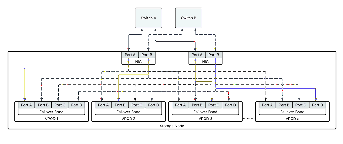
Storage Nodes have four 200 Gb or two 400 Gb ports for the data network. Each virtual storage service or VPOD running on the Storage Node bonds the ports together for active-passive failover, but the primary port (shown by blue lines in the diagrams) selected for each VPOD is different to achieve the highest throughput. Ports can connect to different switches for the best availability.
6.2 Logical Networks
Primary Network
The primary network is on the same physical network or VLAN as the VDURA storage enclosures. The primary data network is accessed through the primary interface (lagg0).
The primary interface may be configured with a DHCP-obtained IP address, a statically configured IP address (for realm managers), and one or more primary gateway IP (GWIP) aliases (for Director Nodes).
Secondary Network
The secondary 25 GbE network is on a separate physical network than the primary network. The secondary network is accessed through the secondary interface (lagg1). For Director Nodes, the secondary interface may be configured with one or more secondary GWIP aliases. Secondary aliases cannot be assigned to a Storage Node, therefore you cannot have a DirectFlow connection over a secondary alias. NFS, SMB/CIFS, and S3 are supported.
Administrative Network
In addition to the primary and secondary networks, Director Nodes also support a dedicated administrative network on a point-to-point connection to igb0. The administrative network is accessed through a static IP address configured on lagg2.
The administrative network is used by VDURA Service Engineers during initial system configuration and other situations as needed to troubleshoot a Director Node or when a Director Node is unreachable due to misconfiguration. Otherwise, the port should remain disconnected.
Gateway IP Aliases
IP aliases are used to assign a second range of IP addresses to Director Nodes that are distinct from the DHCP and statically assigned ones. IP aliases are used for NFS and SMB/CIFS gateway access to provide high availability to NFS and SMB/CIFS client mounts, by transparently migrating the GWIP alias from a failing Director Node to a working one.
In situations where NFS and/or SMB/CIFS is widely used, the use of IP aliases is highly recommended. In this mode, the NFS/SMB/CIFS clients should be configured to connect to an IP alias rather than the physical service address of a Director. This way, if the corresponding Director should fail for some reason, the IP alias will be redirected to another, and the NFS/SMB/CIFS client will see minimal disruption.
Two types of aliases are supported:
- Primary aliases are designed to go on the primary LAG (lagg0) and run on the same network as the rest of the nodes. The DHCP-assigned IP address of each node is often called its service IP address. The primary alias is an IP address that is bound to the same interface as the service IP address. In many cases, the additional range is in the same subnet as the DHCP-assigned addresses. Alternately, if there is a proper gateway, the additional range could be in a different subnet accessed by the same physical network topology.
- Secondary aliases are on a separate physical network than the primary network. With a secondary alias, the lagg1 interface of a Director Node can be given an IP address in the other network.
For the limitation on DirectFlow connections over secondary aliases, see Secondary Network.
Use the following commands to configure primary and secondary aliases:
[pancli] netconfig alias add primary [start IP] [end IP] [netmask]
[pancli] netconfig alias add secondary [start IP] [end IP] [netmask]
The primary flag indicates that the additional range should share the same physical network as the DHCP-assigned range. The secondary flag indicates that the additional range should share the same physical network as the corporate/IT network.
To validate which Directors have been assigned an IP alias, issue the following command:
[pancli] sysmap nodes aliasesIf you have a Director configured in this manner and it fails, do not physically connect the secondary network until after the replacement has been inserted and is up and running. The new Director will send its startup DHCP request via the best interface it has available; if this request is sent over the external network, it will not get an address.
6.3 Networking Modes
Single Link Mode
Single link mode provides the most basic form of network connectivity. It is appropriate when neither redundancy nor load balancing are required. Select single link mode when a single network uplink or network port is sufficient for your application. The port should be an untagged access port, as VLANs are not supported at this time.
Network Failover Mode
Failover mode provides active/passive networking redundancy. Select failover mode when your application requires active/passive redundancy for high-availability.
The physical ports or uplinks used by the interface must be attached to the same VLAN or physical network in a failover LAG and should reside in the same L2 broadcast domain. The LAG should be an untagged access port, as VLANs are not supported at this time. Also, the upstream switch should not be configured to use link aggregation.
Physical ports, also referred to as links, join the LAG in priority order. One link is active, while the remaining (standby) links are passive. If the active link fails, the LAG will automatically use the next available link, in priority order. The high-availability redundancy benefit is maximized when the physical ports or network uplinks terminate on physically separate peer infrastructure switches.
Active/Active Link Aggregation Mode
In active/active link aggregation mode, the physical ports are bonded together into a single logical port called the link aggregation group (LAG). This provides load balancing for increased throughput in the fault-free case, while also providing fault tolerance in the event a physical port fails to ensure that the bonded interface still operates.
The physical ports or uplinks used by the interface are attached to the same VLAN or physical network in an active/active LAG and should reside in the same L2 broadcast domain. The LAG should be an untagged access port, since VLANs are not currently supported.
There are two types of active/active link aggregation (also referred to as port bonding):
- static link aggregation (Static LAG)
- dynamic link aggregation with Link Aggregation Control Protocol (LACP LAG)
Secondary Network Mode
For a description of the secondary network, secondary GWIP aliases, and the supported protocols, see Secondary Network.