
7. Support Tickets
The Support tickets page lists every service request VDURA Sentinel has filed, mirrored live from Jira Service Management.
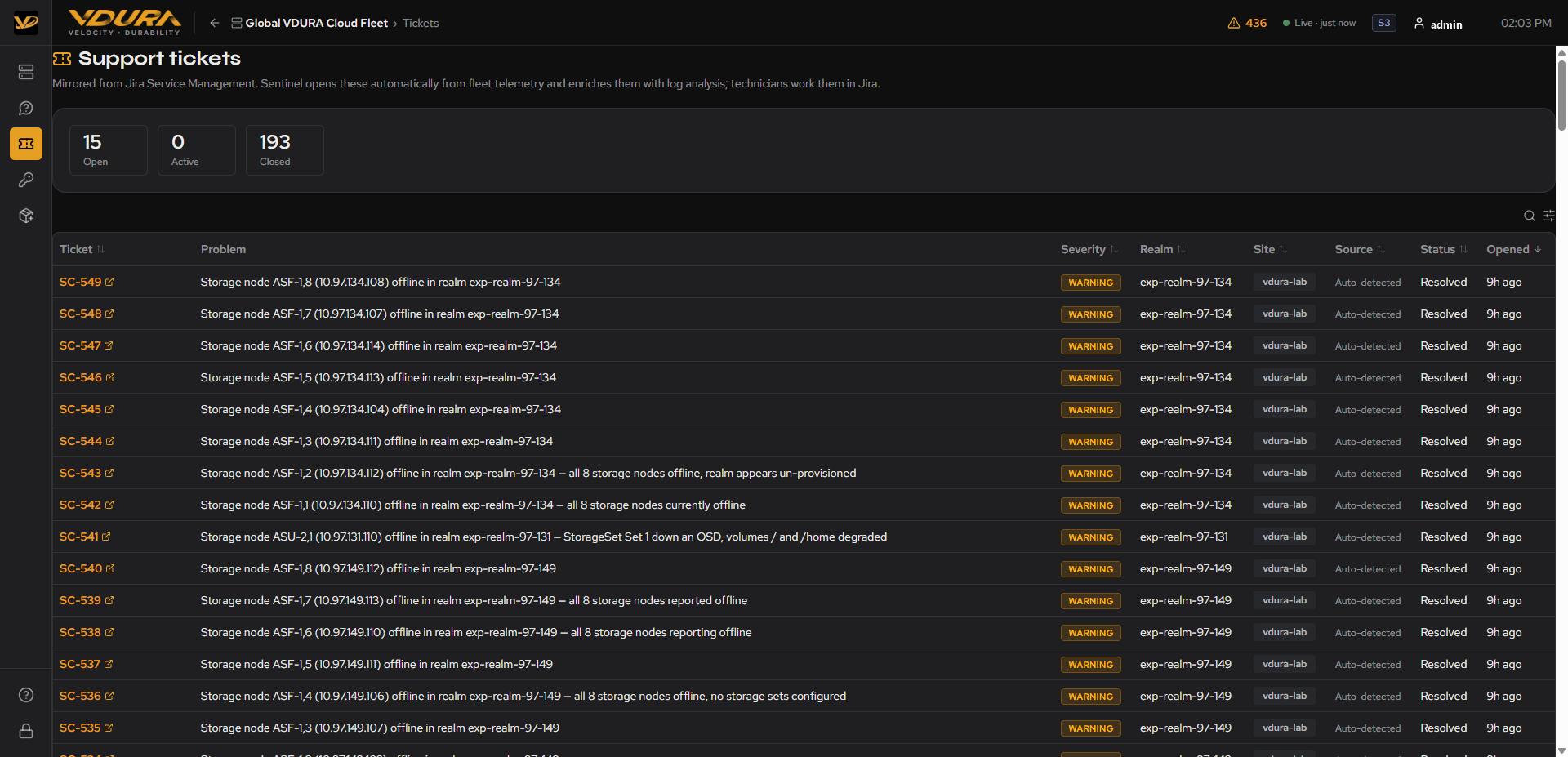 Figure 7.1. The Support tickets page: Open/Active/Closed tiles plus the ticket table.
7.1 Summary Tiles
Three tiles at the top show fleet-wide Open, Active, and Closed counts. Caption: “Mirrored from Jira Service Management. Sentinel opens these automatically from fleet telemetry and enriches them with log analysis; technicians work them in Jira.”
7.2 Ticket Table
| Column | Contents |
|---|---|
| Ticket | The Jira issue key (e.g. SC-549), an external-link icon. |
| Problem | A one-line auto-generated description of the fault, e.g. “Storage node ASF-1,8 (10.97.134.108) offline in realm exp-realm-97-134”. |
| Severity | e.g. WARNING. |
| Realm | The affected realm’s name. |
| Site | The affected site. |
| Source | How the ticket was opened; Auto-detected for telemetry-triggered tickets. |
| Status | e.g. Resolved. |
| Opened | Relative time. |
To open a ticket in Jira: 1. On the Support tickets page (or a realm’s Service Requests card), locate the ticket. 2. Click its Ticket ID/link. 3. VDURA Sentinel opens the underlying Jira Service Management issue in a new tab (a Jira/Atlassian sign-in may be required if you aren’t already signed in there).
7.3 How VDURA Sentinel Decides to Open a Ticket
Auto-detected tickets are not opened on every alert. Three specific conditions trigger one:
- A never-seen-before error alert on a realm.
- Losing a director or a storage node, detected from the realm’s inventory counts rather than from alert text (the same underlying condition is sometimes graded as a warning and sometimes as an error, depending on whether the node stopped cleanly or crashed).
- A realm VDURA Sentinel cannot read at all. The absence of telemetry is itself treated as a fault, since neither of the other two conditions can fire without data to evaluate.
Each candidate goes through an automated triage pass before a ticket opens, so routine noise doesn’t reach Jira. A ticket that does open carries the triage verdict, suggested next steps, the realm’s state at that moment, a short recent health history, and similar past cases, so a technician has context before looking at it. If the fault clears on its own (confirmed by telemetry), VDURA Sentinel closes the ticket automatically; if the same problem recurs within 7 days, VDURA Sentinel reopens that same ticket rather than filing a new one.
Auto-ticketing is configured per site and is off unless a site has been set up for it, so not every site’s alerts will produce tickets this way.