
12. Multi-Tenant Networking (VLAN and VXLAN)
This chapter explains how PanFS keeps each tenant’s network traffic separate with VLAN or VXLAN, how to configure a tenant network, and what your switches and DirectFlow Clients need.
Note: Multi-tenancy is not supported on InfiniBand. Tenants require an Ethernet network because tenant isolation is carried by VLAN or VXLAN encapsulation and InfiniBand cannot carry either one. A realm whose clients connect over InfiniBand cannot have tenants created on it. Realms that run only the platform tenant are not affected.
12.1 Summary
PanFS uses VLAN or VXLAN to isolate traffic between tenants. Each tenant network configuration is placed on a numbered VLAN or VXLAN segment, and a realm runs only one segment type, VLAN or VXLAN, at a time.
- Where it applies: Tenant networks only. The platform data network does not support tagged VLANs or VXLAN.
- Default: Every realm defaults to the VXLAN segment type. No tenants exist by default, and access to storage follows the normal DirectFlow mount rules.
- When multi-tenancy is enabled or disabled: Global mounts are not supported while multi-tenancy is enabled. Unmount any platform tenant mounts before you create the first tenant. Delete client mounts before you delete tenant volumes and remove the tenants.
- Who chooses: An administrator. The segment type defaults to VXLAN and can be changed to VLAN through PanAPI before any tenant network configuration exists (see 12.6). Vantage shows the segment type and does not change it.
- What you set: A segment ID, plus a tunnel UDP port for VXLAN. Both are fixed for a tenant once its network configuration exists. To change them, delete the tenant’s volumes and network configuration and create the configuration again. For VLAN, specify only the VLAN ID. As with VXLAN, the VLAN ID cannot be changed without recreating the configuration.
- Switches: On a realm with VXLAN tenant networks, node ports stay untagged access ports, and the switches carry only standard untagged Ethernet frames. The underlay network between clients and storage may be routed; that infrastructure is outside the control of VDURA. On a realm with VLAN tenant networks, the switch ports connected to VDURA Data Platform nodes are 802.1Q trunks. Clients may be on the same subnet or on a different subnet behind a standard layer 3 gateway.
- RDMA: RoCEv2 works with both types of tenant network. For VLAN tenant networks, all traffic uses the VLAN tenant network. With VXLAN isolation, the DirectFlow Client establishes TCP connections over the VXLAN interface, and an exchanged key then activates secured RDMA transfers over the platform network.
- Not available: InfiniBand is not supported for multi-tenancy or tenant networks.
12.2 Network Models
This section covers VXLAN Overlay and Platform Underlay, VLAN-Based Tenants, VLAN-Based Tenants with a VXLAN Underlay, and Topology Matrix.
12.2.1 VXLAN Overlay and Platform Underlay
Figure 12.1 shows a simple generic pairing of an overlay network and an underlay network. The overlay network is the tenant network, and the underlay network is only the physical transport, which is the platform network. There are multiple overlay networks, one per tenant. The diagram shows two endpoints (VTEPs). In an actual deployment there is an endpoint for every VDURA Data Platform device, and an endpoint for each client when the VTEP is terminated within the Linux client, or on a network switch that hosts the endpoint for a VLAN with several clients that are not VXLAN aware.
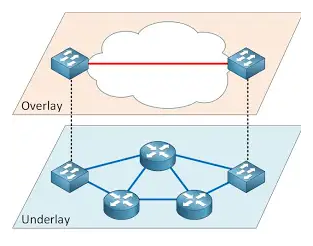 Figure 12.1. A generic overlay network above an underlay network.
The underlay network is invisible to the overlay network, and each overlay network is invisible to the other overlay networks. If the Linux DirectFlow Client is itself the VTEP, the client needs an interface on the platform network, or a routable path to the platform network that uses an interface not associated with the VNI, so that RDMA can work.
12.2.2 VLAN-Based Tenants
Figure 12.2 shows a generic physical network in gray, which is the platform network, with several independent VLANs (10, 20, and 30) that map to tenant VLANs. The clients are not on the platform network.
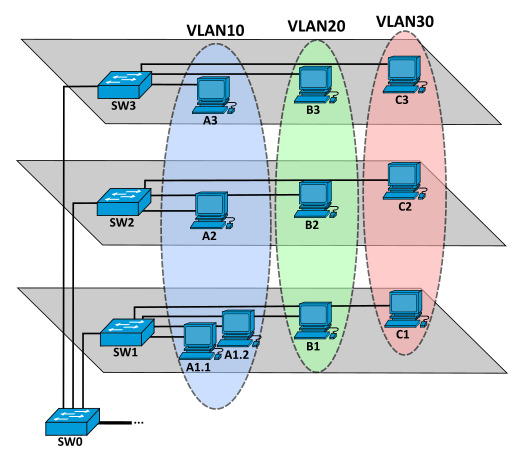 Figure 12.2. A physical network carrying three independent tenant VLANs.
12.2.3 VLAN-Based Tenants with a VXLAN Underlay
A VXLAN underlay network can be invisible to the storage. In that case PanFS implements a standard VLAN-based tenant, and your own infrastructure is configured to tunnel that VLAN through its underlay network (Figure 12.3). The disadvantage of this option is how broadcast and unknown unicast traffic is replicated in the platform network. For sophisticated network environments, this topology lets your network team implement more advanced VTEPs on their own switches, acting as endpoints on both the VDURA Data Platform side and the client side. The platform network used by the VDURA Data Platform nodes can stay untagged and be mapped to a VNI that is invisible to the storage system. The usual rule still applies; all VDURA Data Platform nodes must be in the same broadcast domain.
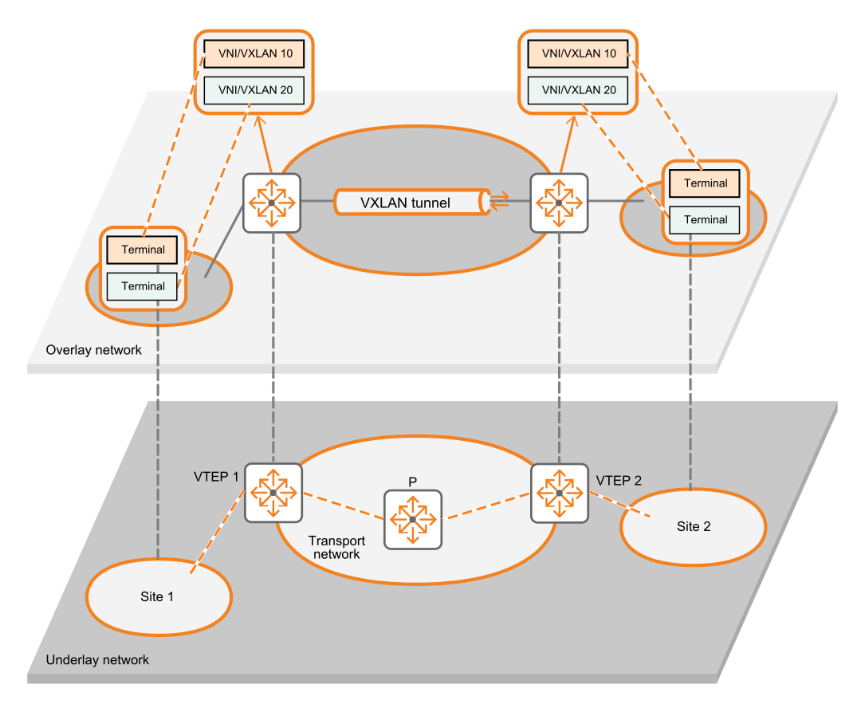 Figure 12.3. A VXLAN tunnel between two sites over an underlay network.
12.2.4 Topology Matrix
The following table summarizes the topologies by realm interfaces, realm switches, client switches, and client interfaces.
| Realm Interfaces | Realm Switches | Client Switches | Client Interfaces | Notes |
|---|---|---|---|---|
| VXLAN VTEP Tenant Untagged Platform |
Untagged | Untagged | VXLAN VTEP Tenant Platform Routable |
End-to-end platform network connectivity is required for RDMA, in addition to the tenant VNI network. |
| VXLAN VTEP Tenant Untagged Platform |
Untagged | VXLAN VTEP Tenant | Untagged or VLAN Platform Routable |
Realm nodes and client switches act as VTEPs. Clients still need a routable path to the platform network for RDMA, which can use VLAN tags on the same physical NIC. |
| VLAN Tenant Untagged Platform |
Untagged or Access Platform Tagged Tenant |
Tagged and/or Access | Untagged or Tagged | The VDURA Data Platform nodes must have untagged frame support in the platform network, which may be an access VLAN. Clients need access to the tenant network only. |
| VLAN Tenant Untagged Platform |
Untagged or Access Platform VXLAN VTEP |
VXLAN VTEP Tenant | Untagged or Tagged | The VDURA Data Platform nodes must have untagged frame support in the platform network, which may be an access VLAN. VLAN-to-VNI mapping is used in the realm switches and the client switches. Clients need access to the tenant network only. Because the VTEPs are implemented only in the switches, more sophisticated VXLAN features, such as L2 EVPN with BGP, can be implemented on your side. |
12.3 How PanFS Uses VLAN and VXLAN
A tenant reaches storage through one network configuration (called a subnet in PanAPI). A network configuration is a private IP subnet, the address range the tenant uses, placed on a VLAN or VXLAN segment. Each tenant’s traffic stays separate from other tenants’ traffic.
| Setting | What it means |
|---|---|
| Segment type | vlan or vxlan. A realm-wide setting. The default is VXLAN. To change it, see 12.6. |
| Segment ID | A VLAN ID when the realm runs 802.1Q (1 to 4094), or a VNI when it runs VXLAN (1 to 16777215). Leave it empty and the realm assigns an unused one. |
| Tunnel UDP port | Used only on a realm with VXLAN tenant networks. Leave it empty and the realm applies its default, the standard port 4789. |
| Underlay and overlay | A host attached to a VXLAN subnet has an underlay address (its address on the platform network, which is also its tunnel endpoint) and an overlay address (its address on the tenant network). |
The rules that follow from this:
- One segment type per realm. A tenant’s network configuration is limited to the segment type the realm already holds. A subnet on a different segment type is refused.
- Segment IDs are unique across the whole realm, not per tenant. The identifier space belongs to the physical interface that every tenant on a node shares.
- Fixed at create. The segment ID, tunnel UDP port, and address-allocation model cannot be changed afterward. In Vantage, only the name, gateway, address range, and MTU can be edited.
- A realm with no segment type. A realm whose segment type setting is missing or unrecognized refuses to create a network configuration.
- Switching types requires removing all tenants, volumes, and network configurations, then changing the realm setting (see 12.6).
12.4 Configuring Segments in Vantage
You configure a VLAN or VXLAN segment when you create a tenant’s network configuration, on the tenant’s Networking tab (see 9.2.3 and 9.2.4). The form’s banner shows the realm segment type.
- Open the tenant and select the Networking tab. A tenant with no network configuration shows “No network configurations yet”.
- Click Create Configuration. A tenant can have only one network configuration, so the button is greyed out afterward.
- On a realm with no network configuration yet, a banner says the segment type will be fixed at VXLAN once you create the first one. To use VLAN instead, change the realm segment type before you create any configuration (see 12.6).
- Enter a Name (3 to 31 characters, using letters, digits, underscore, or hyphen) and the Network in CIDR notation, for example
10.0.1.0/24. The host part must be zero. - Optionally set a Gateway and an Address Range. Leave the range empty to make the whole network usable.
- In the Network Segment section, optionally set a Segment ID, the VXLAN VNI or VLAN ID of the network the DirectFlow Clients connect from. Leave it empty and the realm assigns an unused one. On a realm with VXLAN tenant networks, you can also set a Tunnel UDP Port, or leave it empty to use the standard port 4789.
- In the Advanced section, set an MTU (empty uses the platform default; see 12.8) and choose Address Allocation: System (the default) or External allocator.
- Click Create Network Configuration.
Two things to expect:
- The network must be large enough for all the realm nodes. Otherwise Vantage shows an error that the usable-address window holds fewer addresses than the realm primary pool. Widen the CIDR (a /16 instead of a /24, for example) or the address range, and create the configuration again.
- The tenant is not ready right away. It moves from Setup Incomplete to Finishing Setup, which takes about a minute, and then to Active. Volumes can be created only once the tenant is Active.
After creation, the card shows the segment type, segment ID, and tunnel port as read-only fields. Edit changes only the name, gateway, address range, and MTU. Delete asks you to confirm and cannot be undone. A tenant that still owns a network configuration cannot be deleted. Unmount clients before you remove the configuration.
12.5 Configuring Network Segments with panctl and PanAPI
With panctl, panctl subnets create takes --segment-id and --tunnel-udp-port; both can be set only at creation time (see the VDURA PanCTL User Guide). Through PanAPI, the segment ID and tunnel port are set on the subnet, and the realm segment type is reported by the segment type endpoints (see chapter 12 of the VDURA PanAPI Reference Guide).
| Endpoint | Use |
|---|---|
POST /api/v1/tenants/{tenant_id}/subnets |
Create a subnet. Accepts segment_id and tunnel_udp_port. |
GET /api/v1/tenants/{tenant_id}/subnets/{subnet_id} |
Read a subnet, including segment_type. |
PATCH /api/v1/tenants/{tenant_id}/subnets/{subnet_id} |
Edit a subnet. The segment values are refused here because they are fixed at create. |
POST /api/v1/tenants/{tenant_id}/subnets/{subnet_id}/attachments |
Attach a host and add it as a VXLAN peer. The response carries a tunnel recipe only when the segment is tunnelled. |
GET /api/v1/subnets/segment-type, PUT /api/v1/subnets/segment-type |
Read or set the realm segment type (see 12.6). |
A create request:
{
  "name": "storage-net",
  "ip_range_base": "192.168.50.0",
  "ip_range_prefix": 24,
  "gateway": "192.168.50.1",
  "segment_id": 10,
  "tunnel_udp_port": 4789
}
The fields that matter here:
segment_id: Integer, up to 16777215. Leave it out and the realm assigns an unused identifier; 0 leaves it unassigned.tunnel_udp_port: Integer, 1 to 65535; 0 uses the realm default. Meaningful only when the realm runs VXLAN.segment_type:none,vlanorvxlan. Returned, never accepted.mtu: 0 for the platform default, otherwise 1 to 9216.
Errors you may meet when creating a subnet:
| Code | Cause |
|---|---|
| 400 | A segment ID was offered while the realm names no segment type, or it falls outside the range that type defines. |
| 409 | The name is taken, the segment ID is held by another subnet, the realm already carries subnets on a different segment type, or the realm serves DirectFlow Clients over InfiniBand. |
| 422 | The request body fails validation, including segment ID and port bounds. |
| 503 | The realm cannot say which segment type applies. Only an operator can fix it. |
12.6 Changing the Realm Segment Type
The realm segment type is set through PanAPI. Vantage and panctl show the type of each network configuration and do not change the realm setting. The change is accepted only on a realm with no tenant network configurations, so remove all tenants, with their volumes and network configurations, first.
1. Log in as the Platform Admin. <realm-address> is the address of the realm president.
API=https://<realm-address>
read -rs -p "Password for admin: " PANPW; echo
TOKEN=$(curl -s -X POST "$API/api/v1/auth/login" \
  -H "Content-Type: application/x-www-form-urlencoded" \
  --data-urlencode "username=admin" \
  --data-urlencode "password=$PANPW" | jq -r .access_token)
unset PANPW
2. Show the current segment type.
curl -s "$API/api/v1/subnets/segment-type" \
  -H "Authorization: Bearer $TOKEN"
Example output: {"segment_type":"vxlan"}
3. Confirm that no subnets remain.
curl -s "$API/api/v1/subnets" \
  -H "Authorization: Bearer $TOKEN"
4. Change the segment type (vlan or vxlan).
curl -s -w "\nHTTP %{http_code}\n" -X PUT "$API/api/v1/subnets/segment-type" \
  -H "Authorization: Bearer $TOKEN" \
  -H "Content-Type: application/json" \
  -d '{"segment_type": "vlan"}'
5. Verify the change by repeating step 2.
Response codes for step 4:
| Code | Meaning |
|---|---|
| 204 | Segment type changed. No body is returned. |
| 409 | Refused because a tenant still has a subnet. |
| 422 | Invalid value. Only vlan and vxlan are accepted. |
| 401, 403 | Not logged in, or the user lacks the required role. |
12.7 Physical Network Requirements
The platform network (also called the realm network) and the underlay network (when VXLAN is in use) do not support tagged VLANs. Storage Nodes, Directors, and DirectFlow Clients send and receive platform traffic untagged.
- One adapter, several interfaces. Tenant networks do not layer on top of the platform network; they share the physical network adapter with it. Linux builds one interface on the adapter for the platform network and an additional interface for each tenant network, placed in that tenant’s network namespace. A tenant VLAN interface (802.1Q) tags its frames and sends them out of the shared adapter. A tenant VXLAN interface encapsulates its frames and sends them as UDP/IP, using the node’s platform network address as its tunnel endpoint.
- Untagged ports. In single link, failover, and active/active modes, the port or link aggregation group (LAG) carries the platform network untagged (see section 6.3 of the VDURA V5000 Installation and Service Guide).
- Port-based VLAN. The realm can run on a port-based VLAN configured on the switch, which the nodes never see. All Storage Nodes, Directors, and DirectFlow Clients must then be on a network that can reach the tenant network over an IP network. VXLAN tunnel traffic can travel on that VLAN as ordinary IP traffic.
- Routed fabric for VXLAN tenant networks. For a realm with VXLAN tenant networks, the expected design is an L2 or L3 fabric with routed IP addressing across the whole platform network. VXLAN tenant traffic then rides over that fabric.
- Same network. Ports in a LAG attach to the same VLAN or physical network and sit in the same L2 broadcast domain. The primary network is on the same physical network or VLAN as the storage enclosures.
- MTU with VLAN tags. The system supports 1500-byte and 9000-byte IP MTUs on Ethernet. For VLAN interfaces, the node sets the MTU to the underlying interface MTU minus 4 bytes for the VLAN tag. For example, if the underlying interface has an MTU of 9000, the VLAN interface has an MTU of 8996.
- InfiniBand. InfiniBand is not supported for multi-tenancy or tenant networks. A node has Ethernet or InfiniBand HPC cards, not both, and a realm that serves DirectFlow Clients over InfiniBand cannot create tenants.
12.8 MTU for Tenant Networks
VXLAN encapsulation adds 50 bytes to every tenant packet, so the tenant MTU must be at least 50 bytes smaller than the underlay MTU. Recommended on-premises values:
- Switches: 9216 on all underlay ports, which covers 9000-byte IP packets plus headers and tags with room to spare.
- Storage Nodes, Directors, and DirectFlow Clients (the underlay interface and tunnel endpoint): 9000.
- Tenant VXLAN interfaces and subnet records: 8950.
On a realm with VLAN tenant networks the tag adds only 4 bytes on the wire, so tenant interfaces can stay at 9000 with the switches at 9216. Things to check:
- Every endpoint in a tenant subnet must agree: Directors, OSD nodes, gateways, and DirectFlow Clients. DirectFlow Client address configuration is your responsibility, so set the tenant MTU on each DirectFlow Client’s VXLAN interface.
- Do not rely on path MTU discovery across VXLAN. ICMP “fragmentation needed” messages are often dropped at the tunnel endpoint. The symptom is mounts that work while large reads and writes hang. A wrong MTU is a silent black hole, not an error.
- Validate end to end.
ping -M do -s 8922 <peer tenant IP>should succeed and-s 8923should fail (8950 minus 28 bytes for the IP and ICMP headers). - RDMA. The RoCE MTU is fixed at 1024, 2048 or 4096, and RDMA bulk data does not travel inside the VXLAN tunnel, so the tenant MTU matters for control traffic and for I/O smaller than 64K.
12.9 Switch Configuration for Tenant Networks
What you configure on your switches depends on the realm’s segment type. In both cases the platform network stays untagged on the nodes, and PanFS does the tagging or encapsulation itself, using a network namespace and a virtual interface per tenant subnet.
12.9.1 Realm with VXLAN Tenant Networks (the Default)
Every V5000 node is its own VXLAN tunnel endpoint (VTEP). Tenant traffic leaves the node already encapsulated in UDP/IP on the platform network, so when DirectFlow Clients terminate VXLAN themselves the switches see only ordinary IP traffic and need no VXLAN configuration. The switch side needs:
- Untagged access ports. Node-facing ports or LAGs stay untagged access ports on the platform network. No trunking is needed.
- Underlay reachability. IP connectivity between every node’s underlay address and every remote VTEP (DirectFlow Clients, gateways or switch VTEPs), over a flat L2 network or a routed L3 fabric.
- MTU headroom. At least 50 bytes more than the tenant MTU on every hop (see 12.8).
- UDP port 4789 open (or the subnet’s tunnel UDP port) through any access control list (ACL) or firewall in the path.
12.9.2 Adding Peers with the Attachments Endpoint
Why peers are added explicitly. VXLAN has no peer discovery of its own. A tenant subnet still needs broadcast, unknown unicast and multicast (BUM) delivery, for ARP among other things, and the VXLAN standard (RFC 7348) provides it by mapping each VNI to an IP multicast group in the underlay. That mode needs multicast routing (Protocol Independent Multicast, PIM) or Internet Group Management Protocol (IGMP) snooping designed and enabled across the fabric for every VNI. PanFS tenant networks do not use it. The underlay is an ordinary L2 or L3 IP fabric with its usual multicast, but the tenant VXLAN overlay is not mapped to any multicast group, so it carries no multicast and does not depend on your multicast design. It also works on networks that carry no multicast at all.
Without a multicast group, BUM traffic is delivered by head-end (ingress) replication, in which the sending VTEP makes one unicast copy for each known remote VTEP. The attachments endpoint supplies that peer list. Each remote VTEP is added with POST /api/v1/tenants/{tenant_id}/subnets/{subnet_id}/attachments (or panctl subnets attachments create), and the nodes replicate to the list. PanFS therefore needs no control plane such as BGP Ethernet VPN (EVPN), the other common way to learn the list. How the far end is set up depends on where the tenant’s VXLAN terminates:
- DirectFlow Clients terminate VXLAN themselves (a Linux VXLAN interface, a data processing unit (DPU) or a hypervisor virtual switch). Add each DirectFlow Client’s underlay address as an attachment, and use the
tunnelrecipe in the response to configure the DirectFlow Client with the PanFS node VTEPs as its peers. The switches see underlay traffic only. - Your leaf switches are the VTEPs (bare-metal DirectFlow Clients on ordinary VLANs, for example). Add the leaf VTEP addresses as attachments, map the VNI to the DirectFlow Client VLAN on the leaf, and configure the PanFS node VTEPs as static ingress-replication peers for that VNI on the switch.
- Fabrics that run EVPN for the same VNI cannot learn the PanFS nodes through EVPN. Give each PanFS tenant network its own VNI with statically configured remote VTEPs.
12.9.3 Realm with VLAN (802.1Q) Tenant Networks
The nodes tag tenant traffic themselves, so the switch ports must carry the tags:
- Trunk ports. Configure each node-facing port or LAG as an 802.1Q trunk, with the platform network as the untagged (native) VLAN and each tenant’s segment ID allowed as a tagged VLAN.
- Extend the tenant VLANs to the ports facing DirectFlow Clients, as access or trunk ports, so the DirectFlow Clients reach the same broadcast domain.
- MTU. Allow for the 4-byte tag; a switch MTU of at least 9022 for 9000-byte packets (see section 9.5 of the VDURA V5000 Installation and Service Guide).
- Routing. If tenant traffic must leave the subnet, provide the L3 gateway or switched virtual interface (SVI) for each tenant VLAN at the address set as the subnet’s gateway.
12.10 Setting Up a DirectFlow Client on a Tenant Network
PanFS does not configure DirectFlow Client networking. The tenant interface, its address and its MTU are your responsibility. The examples below show the standard Linux commands a DirectFlow Client needs. Names and addresses are examples.
12.10.1 Values a DirectFlow Client Needs
The following table lists each value, where it comes from, and an example.
| Value | Where it comes from | Example |
|---|---|---|
| Platform (underlay) address | The DirectFlow Client’s own address on the platform network | 10.128.9.3 on eth0 |
| Segment ID | The tenant’s network configuration: VNI or VLAN ID | 10100 |
| Overlay address and prefix | Assigned to this DirectFlow Client when it is attached to the tenant network | 10.0.1.50/24 |
| Interface MAC (VXLAN) | The DirectFlow Client’s attachment record | 02:5a:0e:00:01:32 |
| Peer VTEPs (VXLAN) | The realm node platform addresses in the attachment record | 10.128.1.2, 10.128.2.5, … |
| MTU | The subnet MTU, or the platform MTU minus 50 for VXLAN | 8950 |
| Realm manager address | The first Director address on the tenant network | 10.0.1.10 |
12.10.2 DirectFlow Client on VXLAN Tenant Networks
Create a VXLAN interface bound to the platform interface, give it the tenant address, and add one flood entry per realm node so broadcast traffic reaches every peer (head-end replication):
ip link add acme type vxlan id 10100 local 10.128.9.3 dev eth0 dstport 4789
ip link set acme address 02:5a:0e:00:01:32 mtu 8950
ip addr add 10.0.1.50/24 dev acme
ip link set acme up
# one entry per realm node VTEP from the attachment record
bridge fdb append 00:00:00:00:00:00 dev acme dst 10.128.1.2
bridge fdb append 00:00:00:00:00:00 dev acme dst 10.128.2.5
sysctl -w net.ipv4.conf.acme.rp_filter=2- Interface name. Any Linux interface name up to 15 characters; naming it after the tenant makes it easy to recognize.
- MAC and MTU. Use the MAC from the attachment record. If the subnet sets no MTU, use the platform interface MTU minus 50.
- Reverse-path filter. Loose mode (
rp_filter=2) on the tenant interface keeps the kernel from dropping tenant replies. - Surviving a reboot. These commands do not persist. Recreate the interface at boot with the distribution’s network configuration (systemd-networkd, NetworkManager or netplan) or a systemd unit that runs them after
network-online.target.
12.10.3 DirectFlow Client on VLAN Tenant Networks
Create a standard 802.1Q sub-interface on the platform interface:
ip link add link eth0 name acme type vlan id 100
ip addr add 10.0.1.50/24 dev acme
ip link set acme mtu 9000 up- The switch port facing the DirectFlow Client must be an 802.1Q trunk, with the platform network untagged and the tenant VLAN tagged.
- No peer list or flood entries are needed; the switch delivers broadcast traffic within the VLAN.
12.10.4 Mounting PanFS over the Tenant Network
Mount with the standard Linux mount command. With -t panfs it calls the mount.panfs helper installed with the DirectFlow Client:
mkdir -p /panfs
mount -t panfs -o src-ip=10.0.1.50,rdma-mode=auto panfs://10.0.1.10:global /panfs
panfs://<realm manager>:global: The realm manager’s address on the tenant network, which is the first Director address there. Use one address because the realm tells a mounted DirectFlow Client about realm manager changes.src-ip=<overlay address>: Required. It pins the DirectFlow Client’s iSCSI and realm manager sessions to the tenant interface.rdma-mode=auto: RDMA over the platform network when the DirectFlow Client has an RDMA device and the Storage Nodes offer it, TCP otherwise. Userdma-mode=offfor a TCP-only mount.- A tenant with no volume cannot be mounted yet.
mount.panfsreports that it cannot find the object indicated by path “/”.
To mount at boot, add an /etc/fstab line. Mark it noauto and mount it after the tenant interface is up, for example from a systemd unit ordered after the unit that creates the interface. At early boot the Director may not answer yet, so retry:
panfs://10.0.1.10:global /panfs panfs noauto,src-ip=10.0.1.50,rdma-mode=auto 0 012.10.5 Restricting the DirectFlow Client to the Tenant Network
For tighter isolation, a host firewall on the DirectFlow Client can limit traffic to and from the realm node addresses to the paths tenant traffic needs:
- UDP 4789: The VXLAN tunnel.
- UDP 4791: RoCEv2, the RDMA data path on the platform network. If it is blocked on an RDMA-enabled realm, the DirectFlow Client does not fall back to TCP; it keeps retrying the RDMA connect and I/O hangs.
Reject or drop everything else to and from the realm nodes, and reapply the rules at boot.
12.10.6 Checking a DirectFlow Client
ip -d link show acme                                  # vxlan id 10100 ... dstport 4789
bridge fdb show dev acme | grep -c 00:00:00:00:00:00  # one entry per realm node
ping -c 1 -I acme 10.0.1.10                           # realm manager over the tenant network
ping -M do -s 8922 -I acme 10.0.1.10                  # full-size packet, no fragmentation
mount -t panfs                                        # panfs://10.0.1.10:global on /panfs
grep 'panfs://' /etc/fstab                            # carries src-ip=10.0.1.50
12.11 RDMA and Tenant Isolation
RoCEv2 works with tenant networks. PanFS splits each DirectFlow Client connection into two paths:
- Control path over the tenant network. All control traffic, and every I/O smaller than 64K, travels over the tenant’s VXLAN or VLAN segment.
- Bulk data over kernel RDMA on the platform network. I/O of 64K and larger moves between Storage Nodes and DirectFlow Clients over RoCEv2, which is not encapsulated in VXLAN, so the VXLAN overhead does not apply on this path.
Tenant separation on the RDMA path comes from the control path. When a DirectFlow Client logs in to a Storage Node over the tenant network, it registers a random per-session secret. Its RDMA connect request must then carry an encrypted proof of that secret for the session it names. The Storage Node recomputes the proof, compares it in constant time, and rejects any request that does not match. A host that cannot reach a tenant’s control path cannot open RDMA connections to that tenant’s sessions, so the switches need no per-tenant RDMA configuration.
Because RDMA traffic carries no per-packet tenant identity, the network carrying the RDMA path needs:
- Lossless RoCEv2. Priority Flow Control (PFC) on the RoCE priority, Explicit Congestion Notification (ECN) marking for Data Center Quantized Congestion Notification (DCQCN), and consistent Differentiated Services Code Point (DSCP) trust end to end.
- DirectFlow Client-to-client isolation, with private VLAN or port isolation, so DirectFlow Clients reach Storage Node ports and not each other.
- ACLs that allow RoCEv2 (UDP 4791) and RDMA connection management traffic only between DirectFlow Client and Storage Node addresses.
- Anti-spoofing on ports facing DirectFlow Clients (dynamic ARP inspection, IP source guard or the equivalent), so one host cannot take over another’s flows.
12.12 Switch Checklist
The following table compares the requirements for VXLAN and VLAN tenant networks.
| Requirement | VXLAN tenant networks | VLAN tenant networks |
|---|---|---|
| Node-facing ports | Untagged access port on the platform network | 802.1Q trunk: platform network native, tenant VLANs tagged |
| MTU | 9216 switch, 9000 node, 8950 tenant | At least 9022 switch for 9000-byte packets (9216 recommended) |
| Tenant segment on the switch | None, unless the switch is the DirectFlow Client VTEP: then VNI-to-VLAN mapping and static ingress-replication peers | Tenant VLANs allowed on node and DirectFlow Client ports |
| Peers | Each remote VTEP added with the attachments endpoint | Not applicable |
| Firewall and ACL | UDP 4789 (or the subnet’s tunnel port) allowed | Not applicable |
| Gateway | You provide it, if tenant traffic leaves the subnet | You provide an SVI or router per tenant VLAN |
| RDMA (if used) | Lossless RoCEv2, DirectFlow Client-to-client isolation, DirectFlow Client-to-storage ACLs, anti-spoofing | Same |
12.13 Background: Tagged VLANs and VXLAN
When a network adapter adds a VLAN tag or a VXLAN Network Identifier (VNI) to packets, it acts as a tagging or encapsulation point. That differs fundamentally from a port-based VLAN configured on an Ethernet switch.
- Port-based (untagged) VLAN. The switch does all the work. A switch port is assigned to a single VLAN (for example VLAN 10), the adapter sends ordinary untagged frames, and the switch places them in VLAN 10 on arrival. This is how the platform network can sit on a VLAN without the nodes knowing.
- Adapter-tagged (trunked) VLAN. The adapter inserts a 4-byte 802.1Q tag into each frame before sending it. The switch port must be a trunk port, or a tagged member of that VLAN, to accept it. One physical adapter can then carry several VLANs at once. This is how VLAN tenant networks are carried.
- VXLAN. The adapter acts as a VXLAN tunnel endpoint (VTEP). It wraps the original Ethernet frame in a VXLAN header carrying the 24-bit VNI, then in UDP, IP and a new outer Ethernet header. The physical switches see only ordinary IP traffic and are unaware of the tenant network inside. This is how VXLAN tenant networks are carried.
| Feature | Adapter-tagged VLAN | VXLAN (VNI) |
|---|---|---|
| Where tagging happens | At the network adapter | At the network adapter (VTEP) |
| Packet change | Adds a 4-byte 802.1Q tag | Encapsulates the frame in a UDP/IP tunnel (50 bytes) |
| Switch requirement | Trunk or tagged port | Standard Layer 2 or Layer 3 IP forwarding |
| Scale limit | 4,094 VLANs | 16 million+ VNIs |